Delayed Birth Certificate Support Portal
To obtain a Delayed Birth Certificate, the following two main steps are required:
Apply for Permission for Delayed Birth Registration through the Sewa Setu Portal and obtain approval from the District Administration.
After receiving the permission order, apply for the Birth Certificate with the Health Department/Registrar of Births and Deaths.
Use this slider to navigate through the required steps for delayed birth certificate preparation.
Online Form Generation Tools
Generate, fill & print your required documents instantly — each tool opens in a new tab.
Affidavit
Generate the legal affidavit for Delayed Birth Registration. Print on Stamp Paper and get attested by an Executive Magistrate.
Form-1 (Birth Report)
Generate the mandatory Form-1 Birth Report, duly filled and signed by the father/mother for submission at the health center.
GP / Ward Certificate
Online generator for the Gaon Pradhan or Ward Member certificate regarding the child's date of birth.
School Certificate
Online generator for the School Headmaster's verification certificate confirming the child's date of birth and admission records.
Step-by-Step Preparation Roadmap
Follow each slide carefully to prepare a complete, error-free document set for your application.
Primary Objective
To prepare a complete and error-free set of documents for applying for a Delayed Birth Certificate.
Procedural Workflow Overview
Gather student details, parent Aadhaar copies, GP & School Certificates.
Purchase Stamp Paper matching parent names on Aadhaar exactly.
Print affidavit format on Stamp Paper with 21.5 cm top alignment.
Obtain parent signature and school headmaster verification seal.
Cross-verify that names, dates, and spelling match identically across documents.
Apply online via Sewa Setu Portal and get permission approval.
Submit permission order, Form-1, and documents physically at nearest PHC or Office of Joint Director of Health Services, Sonari.
- 1 Student Identification and collect details
- 2 Aadhaar copies of Father and Mother.
-
3 Certificate from Gaon Pradhan or Ward Member regarding the student's date of birth.
-
4 School Certificate issued by the Headmaster/Principal mentioning the student's date of birth..
-
5 Application Form for permission of delayed certificate.
- 6 Hospital Birth Certificate / Polio Card / Other Age Proof.
Before proceeding further, verify that:
- Student's name is identical in all documents.
- Father's name matches the Aadhaar Card.
- Date of Birth is consistent in all documents.
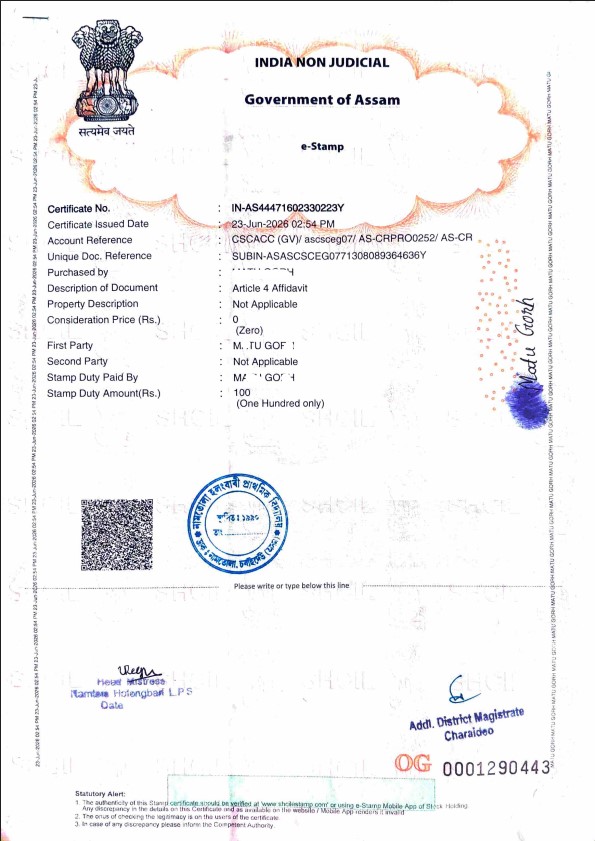
- 1 Purchase a Non-Judicial Stamp Paper in the name of either the Father or Mother.
- 2 The name on the Stamp Paper (First Party and Stamp Duty paid by) must exactly match the name on the Aadhaar Card of the parents. Bring a photocopy (xerox) of the Aadhaar card of both Mother and Father so that the name is written exactly as per their Aadhaar.
Printing Instructions
- Generate affidavit online or download sample layout. Fill & Print
Printing Support
If schools face difficulty in printing, they may bring the Stamp Paper along with all documents to the **Block Rresource Centre** or **District Office** for technical assistance.
Affidavit Generation & Layout
Generate affidavit online or download sample layout.
Parent Endorsement
Obtain the signature or thumb impression of the Father/Mother on the affidavit.
HM Verification Seal
The Headmaster/Principal shall sign and affix the school seal in the identification section.
Magistrate Verification and Seal
The Megestaret shall sign and affix the official seal.
Affidavit Generation & Layout
Generate the affidavit online or download the sample layout (PDF) for printing.
Check that all verification requirements are satisfied:
Sewa Setu Portal Submission
After arranging all the required documents, apply online through the official Sewa Setu Portal:
After submission, wait for approval from the District Administration before proceeding to the next step.
Documents to be Uploaded
-
✓ Affidavit
-
✓ Certificate from Gaon Pradhan/Ward MemberDownload Sample
-
✓ School CertificateDownload Sample
-
✓ Application Form for permission of delayed certificateDownload Sample
-
✓ Hospital Birth Certificate / Polio Card / Other Age Proof
-
✓ Aadhaar Card of Father and/or Mother
Submit Final Application
After receiving the **Permission for Delayed Birth Registration** from the Sewa Setu Portal, submit the final application at any of the following authorized health centers or offices:
JDHS, Charaideo
Office of the Joint Director of Health Services, Charaideo, Rajapukhuri, Sonari, Charaideo, Assam – 785690
Sonari Sub-Divisional Civil Hospital
Rajapukhuri, Sonari, Charaideo, Assam – 785690
Bampather Bengenabari MPHC
Bengenabari, Sapekhati Block, Charaideo, Assam – 785692
Sapekhati BPHC
Sapekhati, Charaideo, Assam – 785692
Borhat MPHC
Borhat Habi Gaon, Sapekhati, Charaideo, Assam – 785692
Tengapukhuri MPHC
Tengapukhuri, Patsaku Block, Charaideo, Assam – 785686
Patsaku BPHC
Patsaku, Sonari, Charaideo, Assam – 785690
Narod Kumar PHC
Sarupathar Gaon No. 2, Patsaku Block, Charaideo, Assam – 785670
Documents Required
-
✓ Form-1 (Birth Report) duly filled and signed by the father/mother
-
✓ Permission for Delayed Birth Registration received from the Sewa Setu Portal
-
✓ Affidavit
-
✓ Certificate from Gaon Pradhan/Ward Member regarding the date of birthDownload Sample
-
✓ School CertificateDownload Sample
-
✓ Hospital Birth Certificate, Polio Card, or other age proof document
-
✓ Aadhaar Card of Father and/or Mother
Important Instruction
Ensure that the Student Name, Father's Name, Mother's Name, and Date of Birth are identical across all documents (Aadhaar, School Records, and Certificates) before submission. Discrepancies will result in verification failure.